
Klaviyo Survey: How to Embed Surveys, Forms, and Quizzes in Your Emails

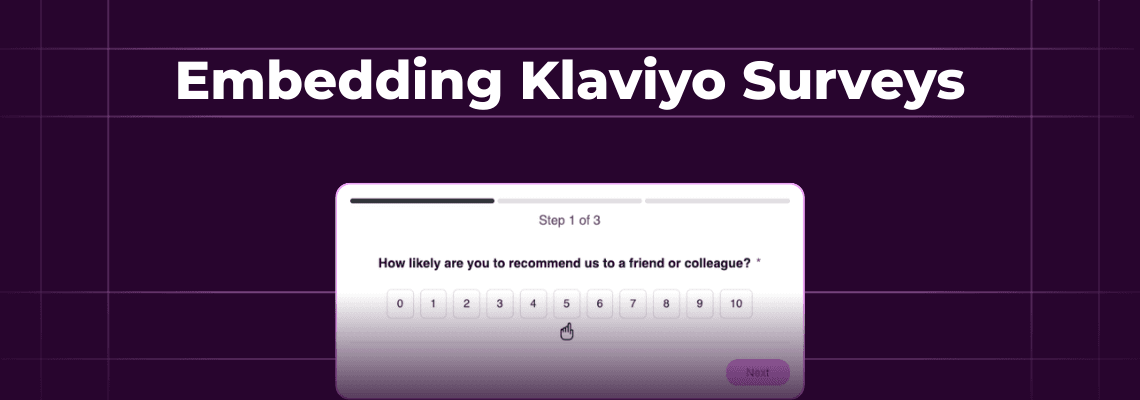
Last month, a Shopify brand told us they sent a post-purchase Klaviyo survey. They linked to a Typeform. Got an 80% open rate on the email. And a 6% survey completion rate.
The other 94% of her subscribers? Gone. Saw the link, didn’t want to open a new window. Ignored.
Klaviyo users have three ways to run surveys in Klaviyo. Native forms (limited to your website), linking out to third-party tools like Typeform and Survicate, and in-email embedded forms that let subscribers respond without ever leaving their inbox. This guide will walk you through all three options, when each works best, how to set them up, and what kind of response rates to expect.
Inside this page
Share this
Summarize with AI
Key Takeaways
Klaviyo doesn't have a native email survey tool. You need either an external survey platform (Typeform, Survicate) or an in-email form tool like Kinetic to collect data through email campaigns.
In-email forms remove the redirect. Subscribers answer directly in their inbox, which can nearly triple response rates compared to linked surveys.
~80% of D2C email lists support interactive email. Apple Mail renders via HTML/CSS, Gmail via AMP, and unsupported clients get a static fallback with a web-hosted alternative automatically.
Keep surveys to 3-5 questions. Completion rates drop from 83% at 3 questions to 65% at 8. Shorter surveys with partial capture collect more total data.
What Are Your Options for a Klaviyo Survey?
There are three approaches to running a Klaviyo survey. Your choice depends on what you're collecting, how many questions you need, and how much friction your audience will tolerate.
Klaviyo's Native Forms and Signup Pages
Klaviyo has a built-in form builder, however it is designed for your website and not your emails. You can create popups, embedded forms, and full signup pages that live on your website. These work well for collecting email addresses and basic preferences at the point of signup.
The limitation: you can't put these forms inside an email. To use them in a campaign, you'd need to link subscribers to a Klaviyo signup page.
Third-Party Survey and Quiz Integrations
Tools like Typeform, Survicate, and ConvertFlow all integrate with Klaviyo. You build your survey in their platform, drop the link into a Klaviyo email, and responses sync back to subscriber profiles through their integration.
This workflow is currently the most popular option, however every response requires your subscriber to leave their inbox, load a new page, and complete the survey there.
In-Email Interactive Forms
The third option is embedding the form directly inside the email itself. Subscribers select answers right in their inbox with no redirect, no landing page, no new tab. These responses also flow straight into Klaviyo profile properties.
Kinetic is one platform that does this. You build forms in a drag-and-drop editor, place them into your Klaviyo template, and send them like any other email. The form renders interactively in Apple Mail and Gmail (which together cover ~80%+ of most D2C email lists), with a static fallback for everything else.
How Do You Create a Survey in Klaviyo?
Klaviyo doesn't have a built-in email survey builder. You can collect data through on-site forms or by connecting external survey tools, but there is currently no native way to embed a full survey inside a Klaviyo email campaign. Here are the two most common workarounds.
Using Klaviyo's Native Forms (On-Site)
Go to Signup Forms in your Klaviyo dashboard
Click Create Signup Form and choose your format (popup, flyout, embed, or full page)
Add form fields for the data you want to collect (email, name, preferences, custom properties)
Set targeting rules - which pages, when to show, who sees it
Publish and link to the form URL from your email campaigns
This approach collects data at the website level. It's fine for preference centers and signup flows, but requires subscribers to click through from email to web.
Adding a Survey Link to a Klaviyo Email
Build your survey in a third-party tool (Typeform, Survicate, Google Forms, etc.)
Set up the Klaviyo integration so responses map to profile properties
Copy the survey URL
In your Klaviyo email template, add a button or text link pointing to the survey
Send the campaign - responses will then sync back to Klaviyo as custom properties
This is currently the most common approach. You get full survey functionality (branching logic, conditional questions, custom design) at the cost of an extra click. Expect completion rates between 5-15% of email openers, depending on your audience and incentive.
How to Embed a Survey Directly in a Klaviyo Email
You can embed an interactive survey inside a Klaviyo email so subscribers answer questions without leaving their inbox. This removes the biggest barrier to survey completion (the redirect) and typically produces significantly higher response rates.
How In-Email Surveys Work
Three technologies make this possible, and the recipient's email client determines which one loads:
Interactive HTML/CSS - renders in Apple Mail (~60% of email opens globally). The form works natively inside the email using advanced CSS techniques.
AMP for Email - renders in Gmail and Yahoo (~29% of opens). Google's AMP framework powers interactive elements inside the inbox. Requires a one-time domain whitelisting with Google, which is free and takes about 10 business days. Read more on the whitelisting process here.
Static fallback - for Outlook and others (~11% of opens). Shows a preview of the form with a link to complete it on a web page.
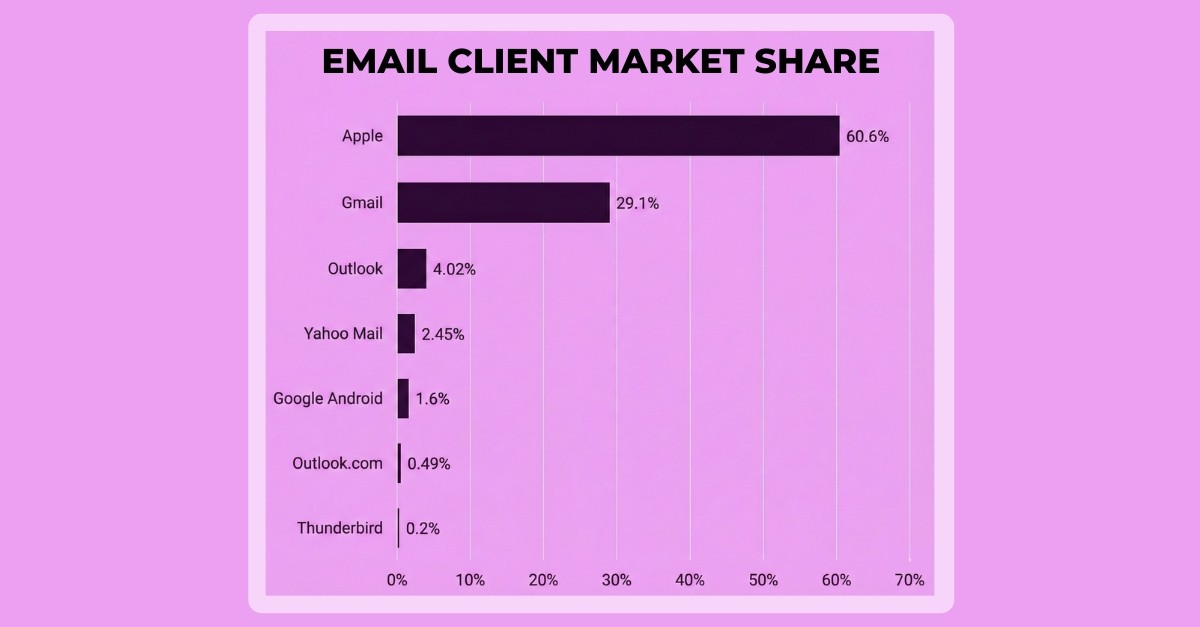
Data from Litmus
For most D2C brands, 80%+ of subscribers see the fully interactive version. The sender doesn't need to segment their list or worry about compatibility, as the right version loads automatically based on each subscriber's email client.
What Types of Surveys Can You Embed?
In-email surveys work best for shorter interactions. The most common types:
Welcome surveys - capture preferences right after signup. Welcome emails hit 80% open rates and 26% click rates, so that's your highest-engagement window.
Product Quiz - capture preferences and zero-party data, then show product recommendations based on their answers.
Post-purchase NPS - one-question NPS score plus optional follow-up.
Product feedback - star ratings, multiple choice, and open text fields
Re-engagement surveys - "Why haven't you shopped recently?" to win back lapsed subscribers
You're not limited to single-page forms either. Multi-page surveys break longer surveys into steps, and partial capture saves responses as subscribers move between pages. If someone drops off on question 4, you keep answers 1 through 3.
Question types include multiple choice, image selection, NPS scales, text input, date pickers, and contact fields. All responses sync directly to Klaviyo profile properties for immediate segmentation.
How to Build a Klaviyo Product Quiz That Collects Zero-Party Data
You can think of product quizzes as surveys with a payoff at the end. Instead of just asking questions, you give subscribers personalized results such as product recommendations, style matches, routine guides. That exchange ("tell us about you, we'll help you find the right product") drives higher engagement and directly feeds your Klaviyo segments.
Landing Page Quiz Tools
For complex product recommendation quizzes with 8+ questions, conditional logic, and custom results pages, dedicated quiz tools for your website are a good option:
ConvertFlow — visual quiz builder with Klaviyo integration, good for multi-step product finders
OctaneAI — built for Shopify, deep Klaviyo integration, popular with beauty and wellness brands
Digioh — enterprise-grade quizzes with advanced logic and targeting
These tools handle branching paths ("If you picked dry skin, skip to question 5") and complex scoring. The tradeoff is the same as any linked survey in that subscribers must leave the email to complete the quiz, or find it on your website during their purchasing journey.
In-Email Quizzes
As with other interactive surveys, you can also run product quizzes directly inside your emails. Kinetic's product recommendation feature connects to your Shopify catalog and displays matching products based on the subscriber's answers.
Research shows 83% on average complete a 3-question survey. That drops to 65% at 8 questions.
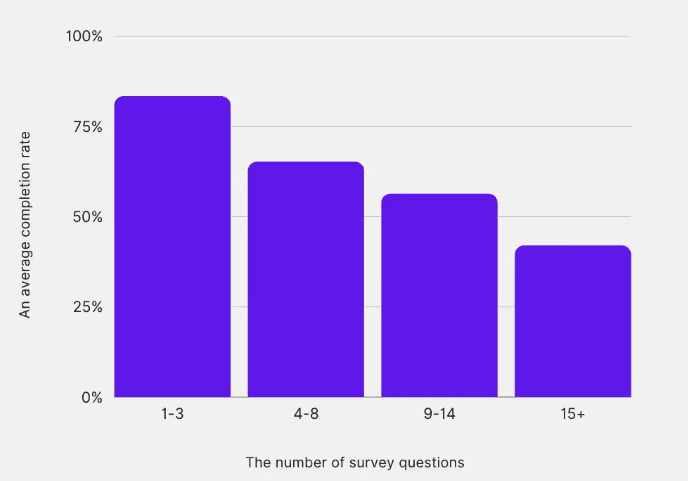
Data from Survicate’s analysis of 264k survey responses
A short and highly targeted product quiz sent at the right time in your email flows can be a very effective way to drive buyers to the product that is best for them, increasing purchase rates significantly.
Embedded Surveys vs. Linked Surveys: What the Data Shows
The case for in-email surveys comes down to one thing: removing friction increases responses.
Dr. Emi Arpa Skin, a leading German skincare brand, ran surveys using both approaches - linked forms and interactive in-email forms. Same questions. Same audience. The interactive in-email version received nearly 300% more responses.
And the downstream impact was even bigger than the response rate alone. The zero-party data they collected let them build targeted segments that produced dramatically higher engagement and conversion rates in follow-up campaigns. Better data in meant better campaigns out down the line.
That pattern makes sense when you look at the mechanics. Each step you add to a funnel loses people. Link in email → new page loads → subscriber reads the page → starts the survey → finishes the survey. Every transition is a drop-off point.
In-email forms compress that to: see the question → tap an answer. Done.
Question count matters too. At 3 questions, 83% of people are likely to finish. At 8, that drops to 65%. For most Klaviyo surveys - welcome preferences, NPS, product feedback - 3-5 questions captures what you need.
But the data you collect only matters if you act on it. The real value isn't only the survey response itself. It's the Klaviyo segment you build from it afterwards, and the personalized campaigns those segments receive.
FAQs
What survey tools integrate with Klaviyo?
Several survey and quiz tools integrate directly with Klaviyo, including Typeform, Survicate, ConvertFlow, OctaneAI, Digioh, and Kinetic. Most sync survey responses to Klaviyo profile properties through native integrations or Zapier. The main difference between them is where the survey lives. External tools host surveys on landing pages, while Kinetic embeds forms directly inside Klaviyo emails.
Can you put a form inside a Klaviyo email?
Yes, but not with Klaviyo alone. Klaviyo's built-in forms only work on websites (popups, embeds, and signup pages). To put an interactive form inside a Klaviyo email, you need a tool like Kinetic that builds interactive templates and pushes them into Klaviyo. The form renders in Apple Mail via HTML/CSS, in Gmail via AMP, and falls back to a web version for other clients.
How many questions should a Klaviyo survey have?
Three to five. Research shows completion drops from 83% at 3 questions to 65% at 8. For welcome surveys, 3-5 questions covering shopping preferences, category interests, and communication frequency captures the data that drives the most personalization value. For NPS surveys, the score question alone gets 89% completion. Add one follow-up and you're still at 78%.
What can you do with Klaviyo survey data?
Survey responses stored as Klaviyo profile properties unlock targeted segments, personalized flows, and dynamic content. A welcome survey asking about product preferences lets you send category-specific emails instead of generic blasts. An NPS survey triggers review requests to promoters and service recovery flows to detractors. Brands using product preference data to personalize emails see 25% higher engagement and 225% better click-through rates on those targeted sends.