
How to Use Klaviyo Dynamic Content (With Ideas Worth Stealing)

You spent weeks building Klaviyo segments. Engaged 30 days. VIPs. Custom segments using zero-party data. First-time buyers. People who clicked that one campaign back in October.
And then you sent every single person on your list the same email.
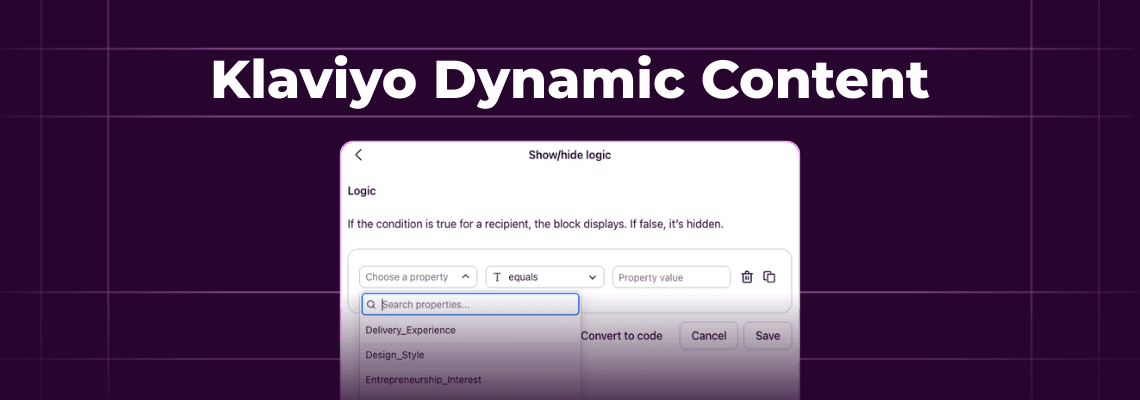
Segmentation is step one. A really important step one, don’t get me wrong. But if you're not using Klaviyo dynamic content to change what people actually see inside the email, you're doing the hard work and skipping the payoff. Show/hide blocks let you display different images, CTAs, product sections, and copy to different subscribers within a single campaign. One template with multiple experiences.
This post walks through how to set it up (simpler than you'd think), then gives you a collection of ideas for putting it to work. Real approaches from marketers who are already doing this, and reasons you might want to try them.
Inside this page
Share this
Summarize with AI
Key Takeaways
Klaviyo dynamic content uses show/hide blocks to display different email sections based on subscriber profile properties, so one campaign can serve multiple audiences
The logic builder supports text, numbers, and list data types. Keep conditions to 3 to 5 per email to stay manageable and testable
Strong use cases include swapping product recommendations by purchase history, adjusting CTAs by customer tier, surfacing loyalty points, localizing offers, and leading with preferred categories
You can't target Klaviyo segments directly in show/hide blocks. Use profile properties as conditions, with segment-triggered flows as the workaround to set those properties
Dynamic content is only as good as the data behind it. Combine purchase history, browsing behavior, and zero-party data for the best results
What Is Klaviyo Dynamic Content?
Klaviyo dynamic content lets you show or hide specific blocks inside an email based on what you know about each subscriber. Instead of creating five separate campaigns for five segments, you build one email that adapts itself on the fly. Different subscribers see different images, text, CTAs, or product sections depending on their profile data.
You probably already have segments for your VIP customers, first-time buyers, and people who haven't purchased in 90 days. Right now, you either send them all the same email or build separate campaigns for each group. Dynamic content gives you a third option: one campaign where the hero image changes, the offer changes, or the product section changes based on who's opening it.
Klaviyo calls these show/hide blocks. You set a condition on any block in your email, and Klaviyo decides at send time whether to display it. The condition pulls from profile properties, the data points attached to each subscriber's record.
This is different from dynamic product tables, which pull product data into flow emails automatically based on event triggers (like an abandoned cart). Show/hide blocks are about controlling which entire sections appear at all.
How Do You Set Up Show/Hide Blocks in Klaviyo?
Setting up dynamic content in Klaviyo takes about 2 minutes once you know where to click. Here's the quick version:
Step 1: Open your email template in the Klaviyo editor. Add or select the block you want to make conditional.
Step 2: Click the Display tab in the block settings. Under Show/hide logic, select Use logic builder.
Step 3: Set your condition. The basic syntax looks like this:
So if you have a profile property called CustomerTier and want to show a block only to VIPs:
Step 4: Save and test. Preview with different subscriber profiles to make sure blocks appear and disappear correctly.
A few things to know. The logic builder supports text, numbers, and list data types. It doesn't support dates, booleans, or event data natively. For those, you'll need the custom code option instead of the visual builder. And property names are case-sensitive: CustomerTier and customertier are two different things.
You can combine conditions with AND/OR operators too. Just keep it simple. The Klaviyo community consistently recommends sticking to 3 to 5 conditions max per email. More than that and you're creating a testing headache.
What Can You Actually Do With Dynamic Content?
Here's where it gets fun. Below are ideas worth trying. None of them are "the one tactic that always works." They're approaches that make sense for specific situations and specific brands. Pick the ones that fit yours and let your imagination run wild with the context of your unique brand and subscriber list.
Show Different Products Based on Purchase History
Someone bought running shoes last month. You could show them running socks and insoles in your next campaign instead of your generic "new arrivals" grid. This works well for brands with complementary product lines.
One example from the Klaviyo Community: a fashion brand had the idea to build post-purchase emails where buying "The Jeans" triggered recommendations for "The Sweater" and "The Tee." Buying "The Trousers" showed "The Blazer" and "The Tank" instead.
You could map out your top 5 to 10 products and decide which 2 or 3 items pair best with each. Then build show/hide blocks to display the right pairings per subscriber.
Swap Hero Images and CTAs by Customer Status
Your VIP customers don't need the same email as someone who signed up yesterday. You could show VIPs early access to a new collection. New subscribers might see your best-seller roundup. And someone who hasn't purchased in 90+ days? Maybe they get a "we miss you" offer with a discount code.
One email, three hero blocks. Each has a show/hide condition based on a CustomerStatus property. Only one renders per subscriber.
Surface Loyalty Points or Rewards Status
If you run a loyalty program, this is a quick win. For members, show a block with their current points balance and how close they are to the next reward. For non-members, swap that block out for one pitching the program benefits with a "join now" button.
Litmus highlights brands like “Mamas and Papas” doing exactly this type of lifecycle-based personalization. Same principle: use what you already know to show what actually matters to each person.
Localize Offers by Geography
If you ship internationally or have physical stores, dynamic content can make your emails feel local. Show free shipping for domestic subscribers and flat-rate international options for everyone else. Surface the nearest store location based on their city. Swap currency references.
You could run location-specific promotions too. A summer sale for subscribers in warm climates while northern customers see something different. The condition is just person|lookup:'Country' == 'US' or whatever your geography property looks like.
Personalize Post-Purchase Follow-Ups
A giftwear brand in the Klaviyo Community used product tag conditions so someone who bought a "Father of the Bride" item received different follow-up content than someone who bought a "Father of the Groom" gift. Same flow, different messaging.
You could do something similar. Someone buys coffee beans? Show a brewing guide. Coffee machine buyer? Show a maintenance schedule. The content is actually useful, and it cost you one extra block per product category.
[IMAGE: Example of a dynamic post-purchase email showing care instructions for two different product types within the same template | Alt text: dynamic email content showing different post-purchase blocks based on product category]
Lead With Their Preferred Category
If you know a subscriber buys skincare but never makeup, why lead with makeup in the hero slot? You could reorder your email to show their favorite category first. person|lookup:'PreferredCategory' == 'Skincare' shows skincare up top. 'Makeup' puts makeup first. Everyone else gets your best-sellers as the default.
This does require having a PreferredCategory property on the profile. More on where that comes from in a second.
Add a Cart Recovery Block to Regular Campaigns
Here's one people don't think about often. You probably have a dedicated abandoned cart flow already. But you could also add a dynamic block to your regular weekly campaign that only shows for subscribers with active carts.
Something like "Still thinking about these?" with a button back to checkout. It only appears for people with cart items, so everyone else just sees the normal campaign. An extra touchpoint without sending yet another abandoned cart email.
Adjust Messaging for New vs. Returning Customers
First-time buyers are in a different headspace than someone who's ordered 5 times. You could show social proof, reviews, and "why customers love us" content to new subscribers who need reassurance. Returning customers might respond better to "welcome back" copy with a loyalty perk or early access.
Where Does the Data Come From?
Dynamic content in Klaviyo is only as useful as the profile properties behind it. And here's the honest truth: most ecommerce brands don't have enough of them. They have engagement metrics and purchase history, but not the preference data that makes the ideas above actually work.
There are a few ways to fill the gap.
Purchase behavior from your Shopify integration feeds into Klaviyo automatically. You know what they bought, when, and how much they spent. Build calculated properties like LastPurchaseCategory or TotalOrders from this data.
Browsing behavior through Klaviyo's on-site tracking tells you what people looked at but didn't buy. Useful for intent signals, but limited to subscribers who visit your site.
Zero-party data is what subscribers tell you directly. Preferences, skin type, size, gift vs. self-purchase, birthday month. This is the highest quality data you can get because the customer chose to share it. No inference required.
The strongest setup combines all three. Purchase data gives you history. Browsing data gives you intent signals. Zero-party data gives you context that tracking alone can never infer. Someone bought moisturizer. Are they buying for themselves or as a gift? Only they can tell you that.
The missing piece for most brands
You need strong profile properties to power dynamic content. But collecting preferences usually means sending subscribers to a landing page, where most of them bounce.
Kinetic lets you embed interactive forms and quizzes directly inside emails. Subscribers answer right in their inbox, no redirect needed. Responses sync to Klaviyo profile properties automatically, so you can start using show/hide blocks the same day you collect the data.
If you want the full walkthrough on collecting data through emails, we wrote a guide on embedding surveys in Klaviyo that covers the mechanics step by step.
What Should You Watch Out For?
Dynamic content is powerful but not bulletproof. A few things to keep in mind before you go all-in.
Don't overload conditions. Stick to 3 to 5 show/hide conditions per email max. Each condition doubles the number of email variations you need to check. Ten conditions means over a thousand possible combinations. Nobody's testing all of those.
Always set a fallback block. If someone doesn't have the profile property your condition checks, they see nothing. That empty space in your email looks broken. Create a default block that shows when no conditions match.
You can't target segments directly in show/hide blocks. This trips people up constantly. The logic builder works with profile properties, not segment membership. The workaround from the Klaviyo Community: create a flow that writes a property to subscriber profiles when they enter a segment (like Segment_VIP = true). Then use that property in your show/hide condition. It's an extra step, but it works.
Test across email clients. What renders correctly in Apple Mail might break in Outlook. Always send test emails to multiple inboxes before launching a campaign with dynamic blocks.
Don't make it creepy. There's a line between "this email feels relevant" and "how do they know that about me." Stick to data subscribers knowingly shared. Referencing browsing behavior too specifically in your copy can backfire.
Putting It Together
You don't need to implement all 8 ideas from this post tomorrow. Start with one.
Pick the segment you know best. Maybe it's VIPs. Maybe it's first-time buyers versus repeat customers. Add one show/hide block to your next campaign that swaps the hero section based on a profile property you already have. Watch what happens to your click rates.
Then add a second block. Then a third. Dynamic content is the kind of thing where small, steady improvements compound quickly.
And if the limiting factor is data rather than ideas, that's your first problem to solve. Your dynamic content is only as useful as the profile properties powering it. If you need a way to collect more data without sending people to a landing page, we’ve got you covered.
FAQs
How many dynamic content blocks can you add to a Klaviyo email?
There's no hard technical limit on show/hide blocks. But the practical ceiling is 3 to 5 per email. Each condition adds complexity you need to test and maintain across email clients. Too many conditions create rendering risks and make templates difficult to update later. Start with one or two blocks and expand as you get comfortable with the workflow.
Can you show dynamic content based on Klaviyo segments?
Not directly through the logic builder. Show/hide blocks use profile properties, not segment membership. The workaround is creating a segment-triggered flow that writes a property to each profile when they enter a segment (like Segment_VIP = true). Then reference that property in your show/hide condition. It's an extra step, but the end result is the same.
What data types work with Klaviyo's show/hide logic builder?
Three data types: text, numbers, and lists. The logic builder doesn't natively support dates, booleans, or event data. For conditions based on those types, use the custom code option instead of the visual builder. Custom code uses Django-style template syntax, which gives you more flexibility but requires some familiarity with templating languages.
What's the difference between dynamic content and conditional splits in flows?
Conditional splits separate subscribers into different flow paths, meaning they receive entirely different emails. Dynamic content keeps everyone in the same email but changes specific blocks within it. Use conditional splits when the entire message needs to be different. Use dynamic content when most of the email stays the same but a few sections should adapt per subscriber.