
Shopify Popups: How to Set Up Newsletter, Email & Exit Intent Popups (2026)

The best popups do a few things right. They wait for intent. They offer something specific in return. They get out of the way on mobile. And they sync the captured email into your ESP (usually Klaviyo) with enough context to actually segment.
This post covers how to add a popup to a Shopify store, the four popup types worth running (newsletter signup, email capture with discount, exit intent, and form-based zero-party data capture), the apps that handle each one, and the rules that make the difference between a popup that actually converts and one that gets ignored.
Inside this page
Share this
Summarize with AI
Key Takeaways
The native Shopify Forms app handles basic email capture popups for free, but lacks exit intent, conditional logic, and advanced targeting.
Dedicated popup apps (Privy, OptiMonk, Poptin, Wisepops) add exit intent, A/B testing, multi-step forms, and tighter analytics. Pricing starts around $24-29 per month.
The four popup types worth running on Shopify: newsletter signup, exit intent, email capture with discount, and zero-party data form popups.
Trigger after 5+ seconds of dwell or 50% scroll depth, never on first paint. Mobile needs its own popup design or it covers the buy button.
Treat the email address as the start of the relationship, not the prize. Capturing one segmentation answer alongside the email lifts long-term email relevance significantly.
How do I add a popup to a Shopify store?
Three real options, in order of effort.
Option 1: Native Shopify Forms app (free). Install the Shopify Forms app from the App Store, choose a popup template (modal or inline signup), drag the fields you want, set the trigger conditions, and publish. Live in about ten minutes. The app rates 4.4 stars across 621 reviews and is the right choice for an email capture popup with a discount trigger and nothing else.
Option 2: A dedicated popup app from the App Store. Tools like Privy, OptiMonk, Poptin, and Wisepops give you more popup types (exit intent, spin-the-wheel, slide-ins, multi-step), more design control, and tighter analytics. We'll cover the picks below.
Option 3: Embed a form-based popup. When the popup needs to collect more than an email (preference data, sizing, skin type, gifting context), an embedded zero-party data form is a better fit than a standard popup app. Platforms like Kinetic let you build the form once and run it as a Shopify popup and as an interactive in-email form, with responses unifying to Klaviyo profiles.
Most stores end up using Option 1 or Option 2 for basic email capture, and Option 3 layered on top for the data-collection popups that power segmentation.
Four Shopify popup types worth running
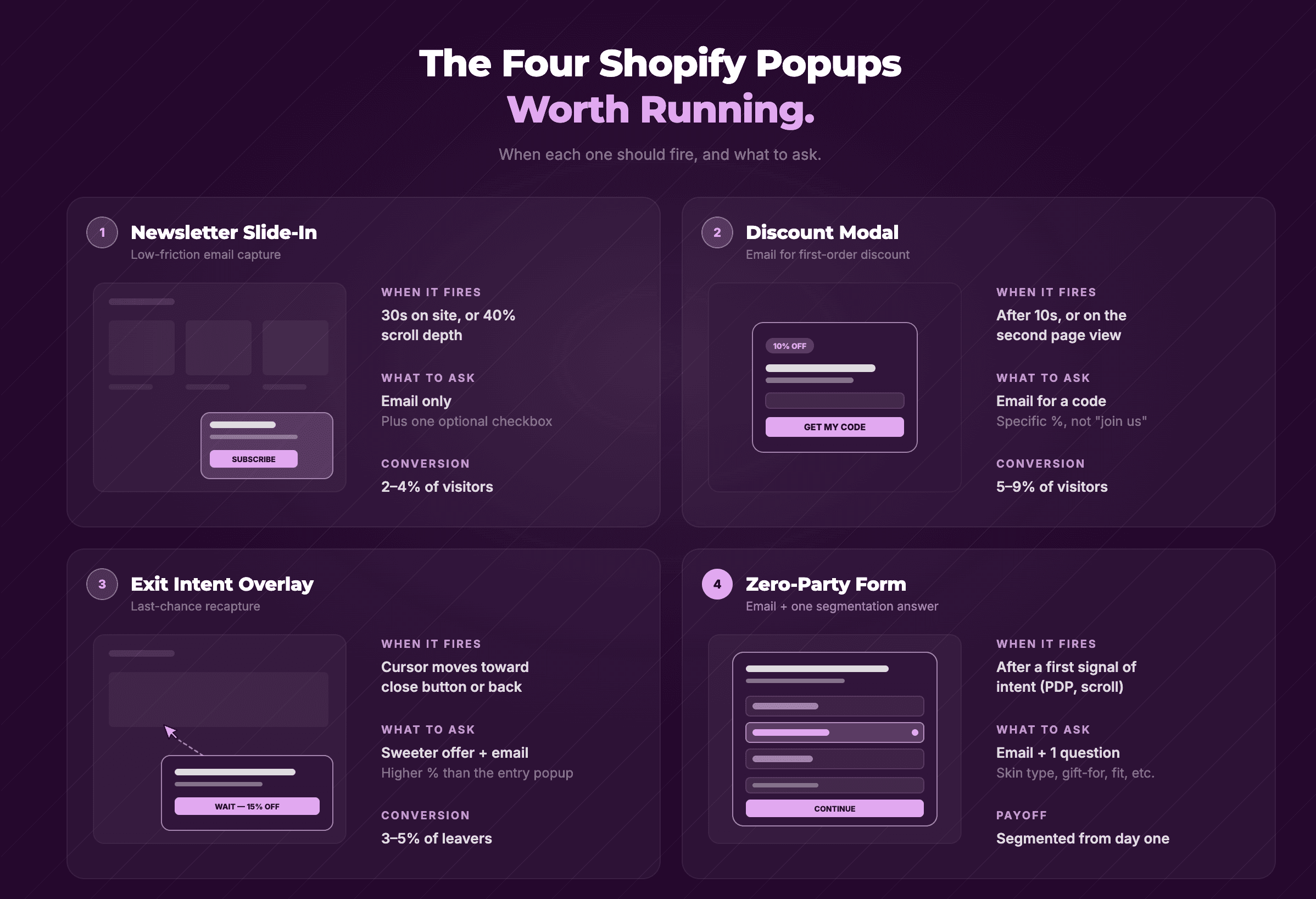
There are roughly twenty popup variants you can build. Most of them are noise. These four pull their weight.
Newsletter signup popup
The classic. A modal or slide-in that asks for an email in exchange for joining the newsletter. Trigger after 30+ seconds of dwell, after a scroll depth of 50%+, or after a second pageview. Never on first paint.
Conversion rates depend almost entirely on the offer attached. "Sign up for our newsletter" alone converts somewhere in the low single digits. "Sign up for our newsletter and get 10% off your first order" routinely runs 5-10x higher because there's a tangible reason to give up the email.
Email capture with discount code
A subset of the newsletter popup, but worth calling out separately because the offer is the whole game. The discount code triggers the conversion. The newsletter signup is the byproduct. Most popup apps generate a unique discount code per signup so you can attribute revenue back to the popup later.
Watch the unit economics. A 15% discount on a $40 average order is $6 of margin. If your popup converts at 4% and your visitor-to-purchase rate from those signups is 25%, you're paying $6 per acquired customer through the discount alone, before any email costs. Worth running. Just measure it.
Exit-intent popup
Fires when the visitor's cursor moves toward the browser's close or back button. Catches abandonment, not active browsing. An exit-intent popup is a last-chance offer to someone who already decided to leave, so the offer needs to be real. A 5% discount won't reverse the decision. A 15% first-order discount or a free shipping threshold sometimes will. This is brand specific, so make sure to pick an offer that works for you and make sure to AB test.
Exit intent only works on desktop reliably. Mobile browsers don't expose the same cursor signal, so most apps fall back to a scroll-up trigger that approximates intent. Less accurate, still better than nothing.
Zero-party data form popup
The most useful and least common. Instead of asking only for an email, this popup asks one or two short questions ("What's your skin concern?" or "Who are you shopping for?") alongside the email field. The answers sync to your ESP as profile properties, which makes every future email more relevant.
Standard popup apps don't really do this well. Most are built for one-field email capture and bolt on extra fields awkwardly. A form-first tool (Kinetic, Typeform, or a custom embed) handles it better and lets the same form run inside your marketing emails too. See our pillar guide on Shopify forms for the broader picture, and our zero-party data guide for what to do with the answers once you have them.
Best Shopify popup apps in 2026
Honest reads on the most-installed options. All review counts and ratings pulled from the Shopify App Store on 2026-05-06.
Shopify Forms (native)
Rating: 4.4★ across 621 reviews. Pricing: Free.
The native option from Shopify itself. Handles popups, overlays, and inline signups. Integrates with Shopify Email and the Shopify customer list. The honest tradeoff: it's basic by design (no quiz logic, no exit intent, no advanced targeting), and a recurring complaint in recent reviews is that submission notifications fire sporadically. Best for stores that want a free email capture popup and nothing more.
Link: Shopify Forms
Privy
Rating: 4.5★ across 4,090 reviews. Pricing: From $24/month for popups, $30/month for email, $45/month for email + SMS. Pricing scales with monthly pageviews.
The veteran in the popup space, launched in 2015. Strong template library, drag-and-drop email editor, and integrations with Klaviyo, Attentive, Mailchimp, Postscript. Multi-step forms and "mini quizzes" are supported on the popup tier. Most-reviewed popup app on the App Store, which says something about install base. Watch the recurring billing pattern in negative reviews if you ever uninstall.
Link: Privy on Shopify
OptiMonk
Rating: 4.6★ across 428 reviews. Pricing: Free plan available, then $29/$99/$249 per month based on pageviews and domains.
AI popup builder that generates on-brand popups from a prompt, then lets you fine-tune in a visual editor. Built-in A/B testing tied to actual order data, not just signups. Strong for brands that want to iterate on popup design quickly without a designer in the loop. Klaviyo and Mailchimp integrations are native.
Link: OptiMonk on Shopify
Poptin
Rating: 4.9★ across 301 reviews. Pricing: Free plan available.
Smaller user base than Privy or OptiMonk, but the highest rating in this comparison. Strong on exit-intent and spin-the-wheel popups. Good fit for stores that want a free starting tier and don't need an enterprise feature surface.
Link: Poptin on Shopify
Wisepops
Rating: 4.9★ across 69 reviews. Pricing: Free trial available.
Newer to the App Store with a smaller review pool, but consistently rated. AI popup builder, email capture, upsells, and cart recovery in one. Worth a look if OptiMonk's pricing feels steep at the Growth tier.
Link: Wisepops on Shopify
Kinetic
Pricing: Free plan available.
A form-first tool rather than a popup-first one. Same form runs as a Shopify popup and inside marketing emails, with answers writing back to one Klaviyo (or other ESP) profile. Multi-step logic, conditional branching, and end-screen routing are built in, so a popup can ask "what are you shopping for?" before showing a tailored offer instead of a flat 10% off. Useful when you need more than an email address — skin type, pet size, gifting context, household role — and want the data on the customer profile, not stuck in a separate dashboard. Less of a fit if you just want a one-field email capture with a discount code.
Link: Kinetic
How to set up a Shopify newsletter popup that converts
1. Pick the trigger before you build the popup. Default to either a 5-second timer with a scroll-depth threshold (e.g., 50% of the page), or a second-pageview trigger. Avoid first-paint popups. They convert worse and they tank your bounce rate metrics.
2. Match the offer to the page. A visitor on a product page should see a different popup than a visitor on a blog post. Most popup apps support page-level targeting. Use it. A 15% discount makes sense on a PDP. A "join the newsletter for skincare tips" pitch makes more sense on a how-to article.
3. Capture more than an email if you can. A popup that asks for "Email + skin concern" or "Email + who are you shopping for?" gives you a segmentation field on day one, not just a contact. It costs you maybe 2-3% in conversion rate and gains you a 30%+ lift in future email relevance.
4. Sync to Klaviyo (or your ESP) with the source. Tag every signup with the popup it came from. "Newsletter Popup," "Exit Intent," "Skin Quiz Popup." This is what lets you build segments later and measure which popups actually drive long-term revenue, not just signups.
Most Shopify popups treat the email address as the prize. The brands quietly winning treat the email address as the start of the relationship and the answer as the prize. A visitor who tells you they have dry skin, or that they're shopping for their dad, or that they cook with cast iron, has handed you everything you need to send them a relevant first email instead of a generic welcome series. Kinetic is built for that. Same form runs as a Shopify popup, runs again inside your Klaviyo welcome flow (as an interactive email) with conditional end screens, and every answer lands on the customer profile as a Klaviyo property. If you want popups that do more than collect emails, have a peek.
Common Shopify popup mistakes
A few patterns that quietly cost you signups and revenue.
Firing on first paint. Yes we’ve said this already. Yes we will say it again. Visitors haven't decided if they care about your store yet at this stage. The dismiss rate on instant popups is brutal, and it sends Google a "high bounce rate" signal at the same time. Wait at least 5 seconds, or positive intent.
Discount with no exclusion list. A "10% off your first order" popup that fires on every visit (including for existing customers, including on the cart page) trains everyone to expect a discount. Add cookie-based targeting to exclude visitors who already saw the popup or already converted.
No mobile design. Desktop popups translated 1:1 to mobile cover the screen and the back button is the only way out. Bounce rate spikes. Build mobile-specific popups or use slide-ins instead of modals on mobile and make sure to test them.
Asking for too much in the popup itself. A popup is a low-attention surface. One or two questions maximum beyond email. If you need richer data (skin type, dog breed, shopping intent), build a dedicated quiz funnel and present it on a different surface (a quiz page, a post-purchase email survey, or an in-email form).
Not measuring beyond signup rate. Signup rate is a vanity metric. The real number is revenue per signup over the next 30/60/90 days, broken down by which popup the signup came from. Most popup apps surface this data; most marketers ignore it.
So how should you start?
If you don't have a popup running yet: install Shopify Forms (free), build a single newsletter signup popup with a 10-15% first-order discount, set the trigger to 5 seconds + 50% scroll, and ship it. Measure for two weeks.
If you already have one running and signups are flat: try an exit-intent popup as a second layer, with a different (probably stronger) offer. Don't run them simultaneously to the same visitor.
If signups are healthy but email engagement is poor: the problem isn't the popup, it's that you're collecting emails without context. Add one segmentation question to the popup, or move to a form-based popup like the Kinetic embed described above. Email engagement that follows zero-party data capture is consistently higher than email engagement that follows a generic discount popup.
For the bigger picture on how popups fit alongside contact forms, product-page forms, and quizzes, the Shopify forms pillar guide maps the full decision space.
FAQs
How do I add a popup to my Shopify store?
Install a popup app from the Shopify App Store. The free native option is Shopify Forms, which handles basic email capture popups, overlays, and inline signups. For exit intent, A/B testing, or multi-step forms, install a dedicated popup app like Privy, OptiMonk, Poptin, or Wisepops. Configure the popup in the app dashboard and it goes live on your storefront.
What's the best Shopify popup app?
There isn't a single best one. Shopify Forms (free, 4.4★) is the right starting point for basic email capture. Privy (4.5★, 4,090 reviews) is the most-installed paid option. OptiMonk (4.6★) is strong for AI-built popups with A/B testing. Poptin and Wisepops both rate 4.9★ with smaller user bases. Pick based on whether you need a free tier, exit intent, or AI-generated design.
How do I add an exit intent popup to Shopify?
Install a popup app that supports exit intent (Privy, OptiMonk, Poptin, and Wisepops all do). The native Shopify Forms app does not support exit intent. In the app, build a popup, set the trigger to "exit intent," and add an offer strong enough to reverse the decision to leave: a first-order discount, a free shipping threshold, or an abandoned-cart save.
Why do most Shopify popups not convert?
Three common reasons: they fire on first paint (dismissed before the visitor decides if they care), the offer is too weak (a "join our newsletter" pitch with no incentive), or the popup covers the buy button on mobile. Add a 5-second + scroll-depth trigger, attach a real first-order discount, and design a mobile-specific version (slide-in or bottom bar) instead of a centered modal.
Can I add a popup to a Shopify store without an app?
Technically yes, by editing your theme's Liquid and adding custom HTML/CSS/JavaScript for the popup. In practice, almost no one does this because the maintenance overhead is high (theme updates, mobile responsiveness, A/B testing, analytics) and the free Shopify Forms app does the same job in ten minutes. Stick with an app unless you have a developer and a strong reason to avoid one.